A company AI assistant for free, that is what thousands of business owners search for. Most of them try a generic chatbot, type a question, and get an answer that is broadly correct but irrelevant to their company. Because the chatbot does not know their price list, their contracts, or their internal procedures. The gap is not in the model. It is in the connection.
The work nobody wants to do
A sales rep needs to know what the company last charged a particular customer. They dig through emails, ask a colleague, open the accounting system. Five minutes. Ten. The customer is waiting. They find the number eventually, or they ask the wrong question and quote a price from memory.
Research consistently shows that the average knowledge worker spends nearly a full working day each week searching for information that already exists somewhere in the company. Not creating. Not deciding. Searching. That time earns nothing.
We had the answer in the system. We just could not get to it quickly.
— A scene from the sales floor of a mid-size manufacturing firm
What a data-connected AI assistant actually means
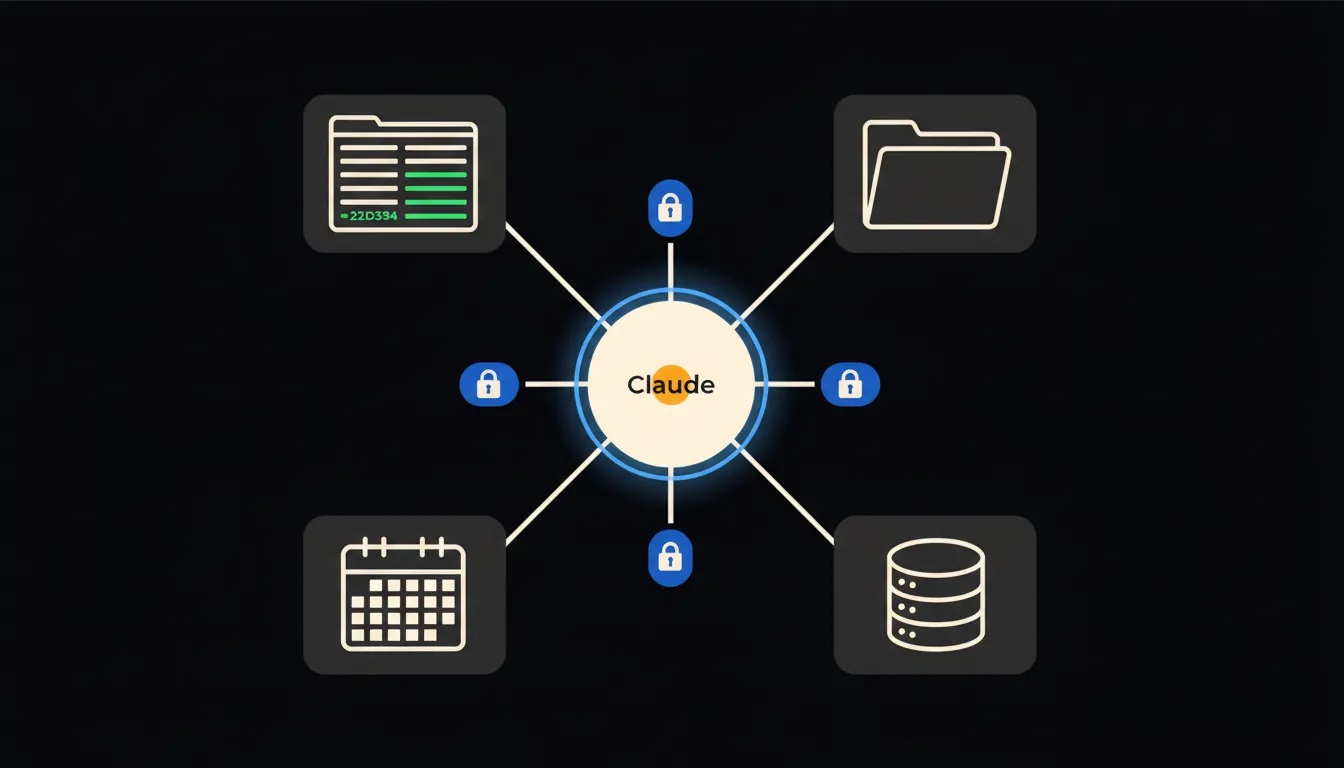
A company AI assistant built on your own data is not a chatbot with a different logo. It is Claude with access to the systems the company already runs: accounting, documents, CRM, email, calendar. Access happens through an MCP server, a small, focused connector that carries the identity and permissions of the specific user who is asking. The assistant sees exactly what that person would see if they opened the system themselves.
Data does not leave the company. It is not indexed into a vendor cache. No shared model is trained on it. The assistant runs on the company's own infrastructure, or its dedicated cloud environment. Every query, every answer, all with an audit trail.
Concretely: Pohoda and documents in Google Drive
Take a company that invoices through Pohoda and keeps internal documents in Google Drive. A sales rep asks: "What did we charge Novak last September, and what are the current terms in our framework contract with them?" Without a connection: three tabs, two minutes, possible error. With the assistant: one question, one answer assembled from data in both systems, in seconds.
- The MCP server for Pohoda finds invoices linked to that customer and returns the relevant records within the logged-in user's permissions.
- The MCP server for Google Drive searches shared folders accessible to that sales rep and finds the current version of the contract.
- Claude combines both results, summarises them, and responds in plain language, including the invoice number and due date if relevant.
- The entire query and response are logged in the platform's audit trail. Anyone on the team can see what was looked up and when.
As an illustration: a team of five sales reps each saving twenty minutes a day recovers roughly thirty hours of clean working time each month. That is not speculation about the future, it is time that today disappears into searching, time that could go into actual business.
What a company AI assistant will not do, and why that is good
The assistant does not send an invoice. It does not sign a contract. It does not decide on a discount for a specific customer. Those decisions stay with a person, by design. The assistant prepares the groundwork: finds the price, locates the contract, summarises the history. The final step belongs to a human.
This boundary is not a weakness. It is the condition under which a company can trust the tool. If the assistant acted autonomously without approval, no one would know what the company had committed to. A clear line between preparation and decision is what makes an AI assistant a usable business tool, not an experimental curiosity.
What it would take
Connecting an assistant to your company systems is not a year-long project. It starts with one system, Pohoda, or Google Drive. One MCP server. One category of queries where the time saving will be immediately visible. Additional data sources are added gradually, starting where the company feels the most friction.
The whole platform runs on your infrastructure or in your dedicated cloud tenant. One administrator. One audit log. No scattered individual subscriptions, no data travelling into shared models. If you want to know what a first step would look like for your company, write to us, a short call is enough.
Where the real gap is
The model is not the bottleneck. Claude is capable enough. The gap is between the model and the data your company produces and stores every day, invoices, contracts, emails, procedures. That data exists. The assistant just has no path to it.
The path is the MCP server. One system. One connection. The permissions of the person asking. Write to us and we will show you what a first connector would look like for your situation.