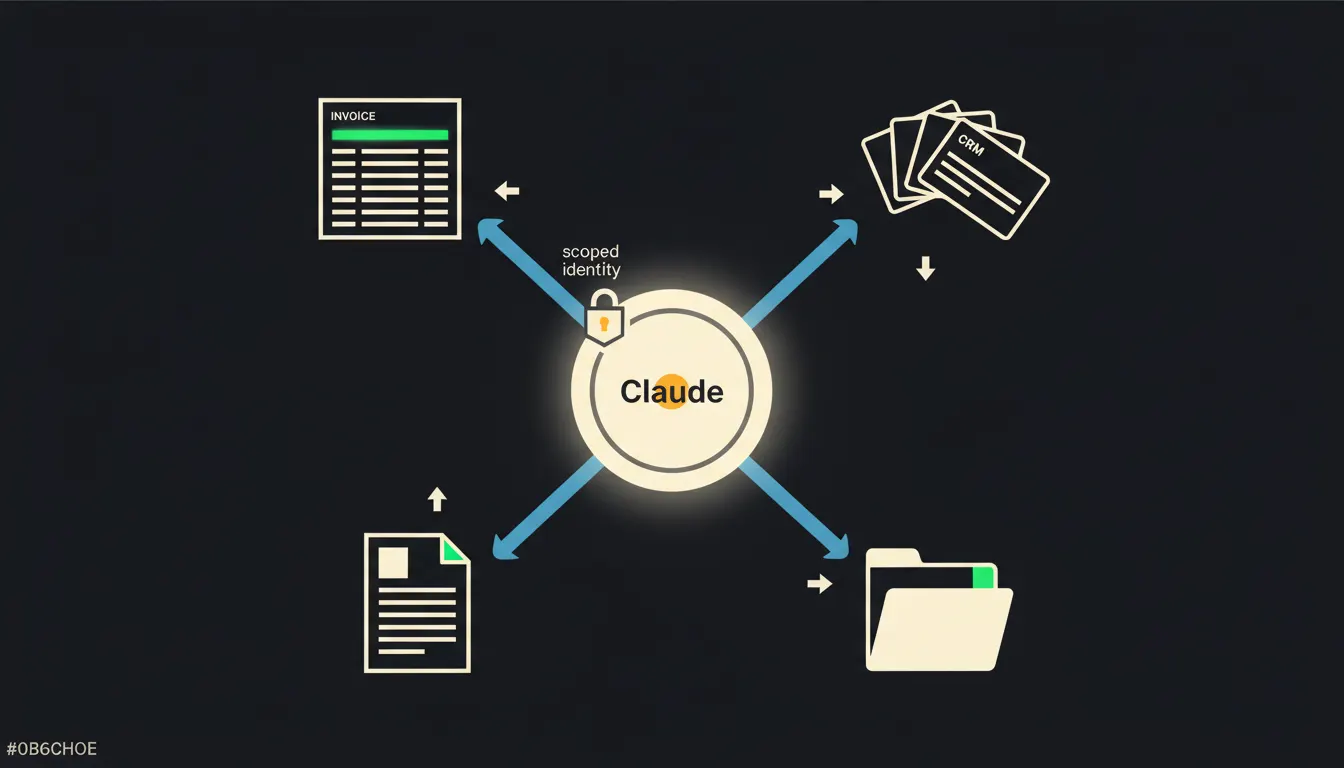
An MCP server is the answer to a question every company eventually asks once they start working with Claude: "How do we give it access to our data?" The answer is not "paste it into the chat." It is a small, focused bridge that connects Claude to one specific system while keeping each user's permissions intact. This article explains what an MCP server actually does, through three examples you will recognise from your own work.
Why copying data into the chat is not enough
Many companies start by having employees manually paste data into a Claude conversation: an invoice here, a CRM export there, a paragraph from a contract. It works. But the cracks appear quickly: the data is stale, incomplete, someone forgot an attachment, and everyone develops their own personal workflow. The result is ten different ways of "using AI at our company" and no shared ground.
The second problem is permissions. The accounts-payable clerk is allowed to see invoices. The sales rep is allowed to see their slice of the CRM, not the whole thing. The office manager can open shared documents, not payroll records. The moment data gets copied manually, those boundaries blur. An MCP server solves this differently: it does not move data, it forwards the query, together with the identity of the person asking.
We wanted to show Claude our invoices. We ended up with a spreadsheet in the chat that was three weeks out of date and missing all the credit notes.
— Finance director, 40-person company, illustrative scene
What an MCP server actually does
MCP (Model Context Protocol) is an open standard Anthropic released in November 2024. It defines how Claude can communicate with external systems in a structured, secure way. An MCP server is the specific implementation for one system: one server for your invoicing tool, another for your CRM, another for Google Drive.
When Claude needs to check the status of invoice 2024-0451, it does not download a copy of your entire database. It sends a query through the MCP server, which translates it into an API call to your invoicing system, authenticated under your identity. It gets back exactly that one invoice. Claude reads it, responds, and nothing is stored anywhere. No copy, no vendor-side cache.
Three practical examples
The abstract description helps, but examples convince. Here are three situations that arise every week in small and mid-sized companies.
- Invoicing (Fakturoid / Pohoda): Claude gets access to the invoicing system through an MCP server. A sales rep asks "Does customer XY have anything overdue?" Claude checks the system under the rep's identity and answers. The accounts clerk can ask Claude to prepare a draft reminder notice: Claude assembles the text from the data, but sending it remains the clerk's decision.
- CRM (HubSpot, Raynet, or your own): A sales representative asks "What did I promise the Novak account on the last call?" Claude looks up the CRM records through MCP and summarises the notes. The rep sees their own data; the sales director sees the whole team. No credential sharing.
- Company documents (Google Drive / SharePoint): An assistant is looking for the current contract template or an internal policy. Instead of browsing folders, they ask Claude in plain language. Claude searches Drive under the assistant's account through MCP and returns the right file, or summarises its key points on the spot.
All three examples share the same pattern: the company did not change its systems. Fakturoid stayed Fakturoid, the CRM stayed the CRM, Drive stayed Drive. A bridge was added. In practice, the setup is measured in weeks, not in a year-long software replacement project.
What an MCP server does not do
An MCP server does not make decisions. It does not sign invoices, approve orders, or send emails without a person's knowledge. It is a read-and-query layer, not an executor. Write actions (marking an invoice paid, adding a CRM note) can be configured, but each one requires an explicit decision about which actions are permitted, and every action is traceable to the specific user whose identity the server carries.
That is precisely why the pattern works. It is not a system with "access to everything." It is a system that knows exactly what it can access and never crosses that line, because the line is drawn by your existing access management, not by a new layer of rules you would have to invent.
What this would look like at your company
The MCP server runs on your infrastructure, not ours. Credentials to your systems never leave your environment. The audit trail belongs to you. This is not a SaaS subscription that routes your data through someone else's shared platform.
The model is not the bottleneck. The gap is.
Claude is a capable model. Without a bridge to your company's actual data, it stays at general answers. An MCP server is that bridge: small, focused, and secure. The three examples above show that this is not a large transformational project. It is adding one bridge to what your company already runs.
If you are curious what this would look like for your specific system, write to us. A short call is enough to estimate the scope and tell you what it would realistically involve.