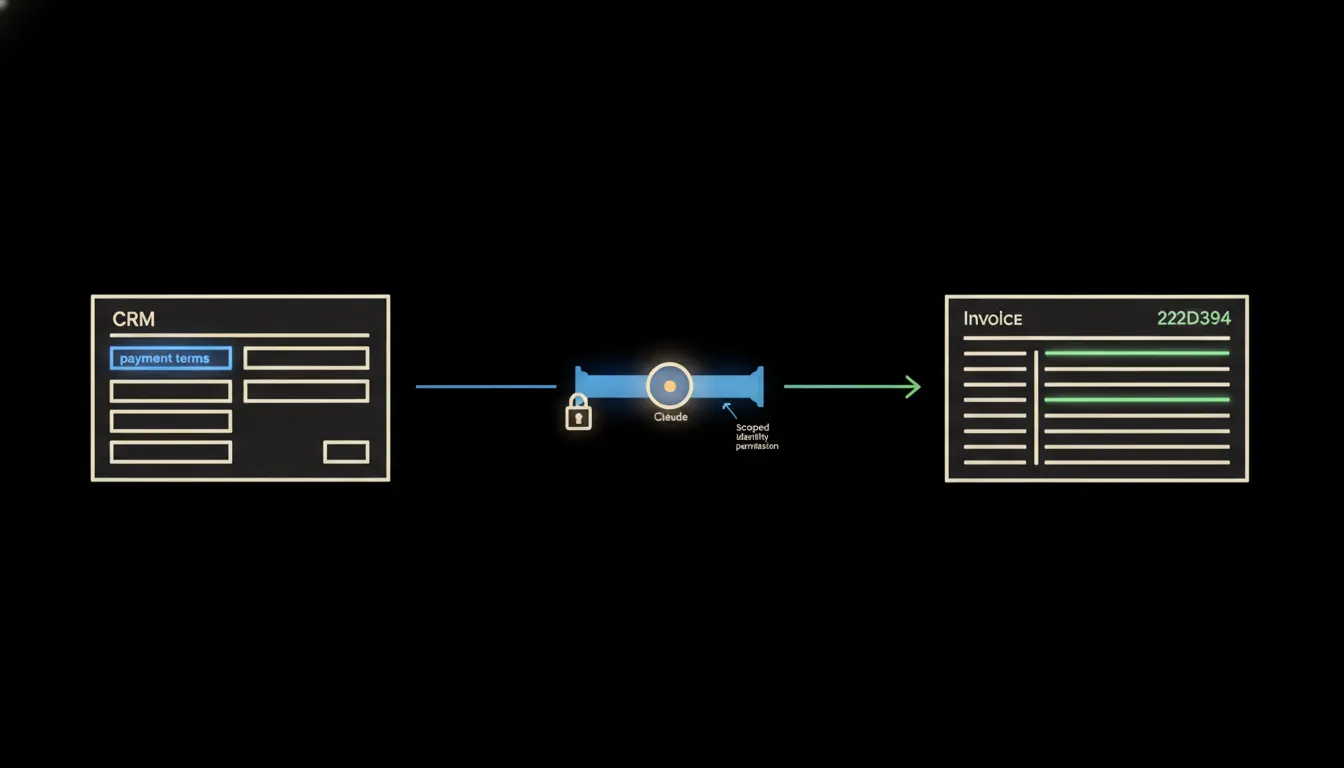
A sales rep agrees 14-day payment terms with a customer, plus a two-percent early-payment discount. They log it in the CRM and move on. The accountant sits down to invoice the same customer — and has no idea what was agreed. They send a message to the sales rep. They wait an hour, sometimes a day. The invoice goes out late, or with the default 30-day terms that were never what the customer signed up for.
The work nobody wants to own
Payment terms are critical data. They affect cash flow, the customer relationship, and the legal validity of the invoice. Yet they live somewhere the accountant cannot easily reach — in the CRM, in the notes field of a customer record, in a field the sales rep filled in when the deal closed.
The result is a routine interruption that repeats dozens or hundreds of times a month. The accountant asks. The sales rep answers — or does not. Invoices wait. Nobody enjoys the situation, because the information exists inside the company. It just is not where it is needed.
The terms were there the whole time. We just had to ask.
— A typical accounts-payable situation, distilled to one sentence
What connecting the systems actually means
Connecting them does not mean the accounting system suddenly reads the CRM. It means Claude gets access to both — via two small MCP servers, each with a clearly bounded scope. The MCP server for the CRM carries the accountant's identity: it sees exactly the data the accountant would see after logging into Raynet or Pipedrive under their own name. Nothing more.
When the accountant opens a customer record and asks Claude to prepare an invoice, Claude looks up the terms itself. It returns a draft invoice with the agreed payment period, any early-payment discount, and a note showing where it got the data — the specific CRM record, the date it was last updated, who wrote the terms in. The accountant reviews, approves, and sends.
Concretely: Raynet or Pipedrive connected to Pohoda
Companies that manage customer relationships in Raynet or Pipedrive and invoice through Pohoda keep data in two places. Pohoda knows the customer, but does not know the terms agreed for the current order — those are in the CRM. The bridge adds one MCP server per system. When an invoice is being prepared, Claude consults the CRM, brings the terms across, and prepares the draft. Estimate: for a company with fifty repeat customers, this could save dozens of queries a month. [ILLUSTRATIVE — actual savings depend on invoicing volume and terms complexity]
- Claude identifies the customer on the invoice and finds their record in the CRM
- It reads the payment-terms field — due date, early-payment discount, any exceptions
- It prepares an invoice draft in Pohoda with the correct terms already filled in
- It attaches a source note: which CRM record, who entered the terms and when
- The accountant reviews and sends — or asks for a correction if the CRM record is missing
Consider a freelancer or a small three-person team where one person doubles as sales rep and project manager. They logged the terms in Pipedrive at the start of the engagement and have not thought about them since. An invoice goes out every month. Claude looks up the terms fresh each time — and if they have changed since the last invoice, it flags the discrepancy. [ILLUSTRATIVE example]
What Claude will not do with payment terms — and why that is a good thing
Claude does not negotiate terms, alter them, or decide whether they are commercially sensible for the company. It does not overwrite the CRM record. It does not send the invoice to the customer. It prepares a draft — and waits.
A mistake in payment terms on an invoice has legal and commercial consequences. Control therefore belongs where the responsibility does: with the person who signs off the invoice. The bridge puts the right data in the right place at the right moment. What the company does with it stays a human decision.
What this would take for your company
The bridge runs on your own infrastructure — not a shared cloud, not a system where your data gets indexed for model training. Access is scoped: Claude sees only what the accountant is permitted to see. There is no new platform to stand up, no integration written from scratch. An MCP server for Raynet or Pipedrive is a small, focused bridge — typically a matter of days, not months.
What is left
The model is not the bottleneck. Claude can read a CRM record, draft an invoice, and carry the right terms across accurately — it does that reliably. The bottleneck was always somewhere else: data the company already had, just not in the place it was needed. The bridge closes that gap.
If you invoice repeatedly and payment terms vary by customer, it is worth a conversation about what connecting your CRM to your accounting system would mean in practice. Write to us — a short call is enough to find out whether it makes sense.